


When it comes to Shopify theme customization, small tweaks can make a big difference in how your store looks and how well it converts visitors into buyers. When it comes to running a successful Shopify store, your theme plays a huge role in how customers experience your brand and decide whether to purchase. A well-optimized theme not only makes your store look professional but also improves user experience, increases trust, and ultimately boosts conversions.
Shopify Theme Customization – 5 Proven Tips to Boost Conversions
At Team90Degree, we’ve worked with countless Shopify themes and stores, and we know the small tweaks that can make a big difference. In this post, we’ll share our top 5 Shopify theme customization tips that will help you turn visitors into paying customers.
Optimize Your Homepage for First Impressions
Your homepage is often the first touchpoint for customers. Within seconds, they decide whether to stay or leave.
- Use a clean and modern layout that reflects your brand identity.
- Add a hero banner or slider showcasing your best products or offers.
- Include clear call-to-action (CTA) buttons such as Shop Now, Explore Collection, or Get Started.
- Highlight your top categories and best-selling products right on the homepage.
👉 Example: Our Shila – Cosmetics & Skincare Shopify Theme is designed with a clean, Cosmetics & Skincare homepage style that instantly attracts customers.

Improve Navigation and Search Experience
If customers can’t find what they’re looking for quickly, they’ll leave. Smooth navigation is essential for conversions.
- Create a mega menu for stores with multiple categories.
- Use descriptive labels (e.g., “Men’s Footwear” instead of just “Shoes”).
- Enable a powerful search bar with predictive search to show relevant results instantly.
- Keep navigation consistent on desktop and mobile.
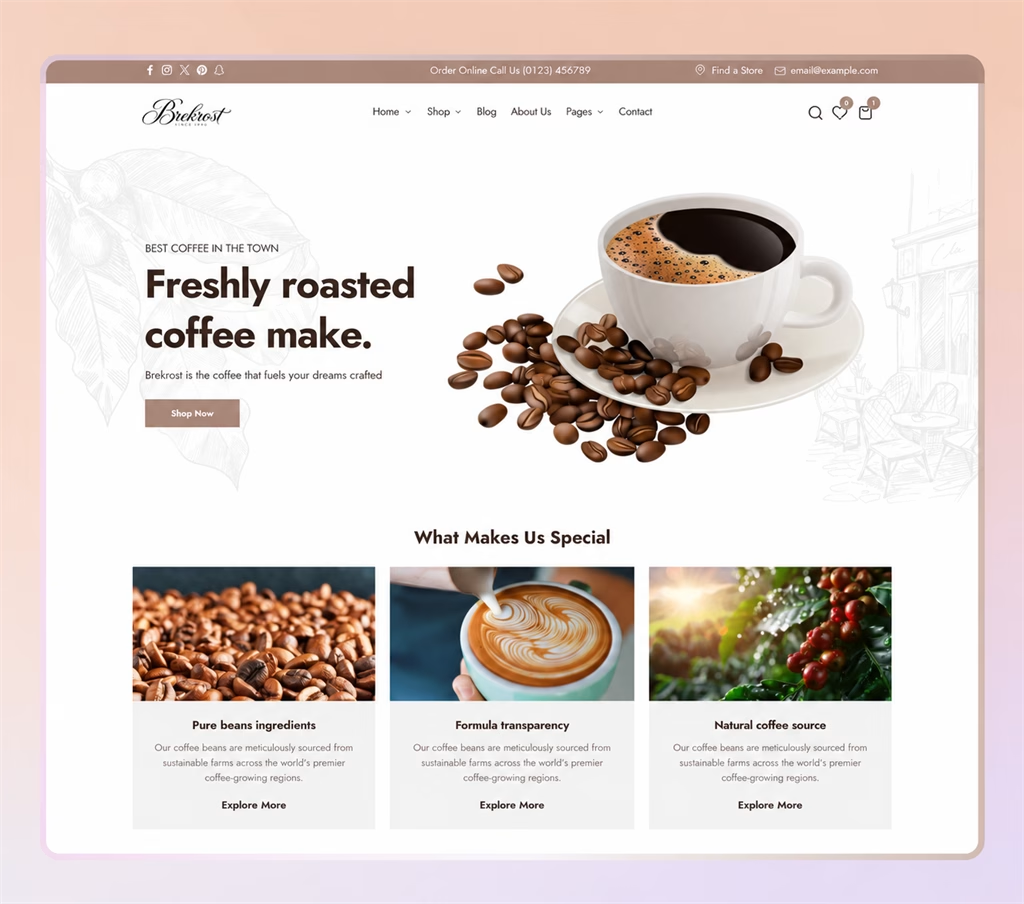
👉 Our Brekrost – Coffee & Tea Shopify Theme includes a flexible mega menu setup, making navigation seamless for large inventories.
Optimize Product Pages for Conversions
Your product page is where purchase decisions happen. Every detail matters here.
- Use high-quality product images (use available zoom or media features where they help explain the product).
- Write clear, benefit-driven descriptions that highlight why the product is valuable.
- Add trust signals like customer reviews, ratings, and badges (e.g., Free Shipping, Money-Back Guarantee).
- Show multiple product variants with real-time price updates.
- Make the Add to Cart action easy to locate without obscuring product options or key details. Test different viewport sizes rather than assuming it is always visible.
👉 See how our Vitazen – Vitamins & Supplements Theme product pages are optimized for conversion with trust badges and smart variant selection.

Boost Mobile Shopping Experience
Review your own analytics to understand the mobile share of your audience. If your store isn’t mobile-optimized, you’re losing sales.
- Ensure your theme is fully responsive and loads fast.
- Make buttons and CTAs thumb-friendly with enough spacing.
- Use mobile-friendly checkout pages with minimal steps.
- Optimize mobile menus for one-hand navigation.
👉 Our Arome – Perfumes Store Shopify Theme is designed for responsive presentation; test the finished store on the devices your customers use.

Add Personalization and Conversion-Boosting Features
Smart personalization can help you stand out and encourage repeat purchases.
- Use product recommendations like You may also like or Frequently bought together.
- Add upsell and cross-sell features directly on product and cart pages.
- Enable multi-language and multi-currency support to reach global customers.
- Use exit-intent popups offering discounts to reduce cart abandonment.
- Integrate live chat or chatbot support for instant customer assistance.
👉 For example, our Memini – Modern Kids Fashion & Toy Store Shopify Theme OS 2.0 includes built-in product recommendation features to boost upsells during seasonal sales.

Final Thoughts
Shopify theme customization is more than just design it’s about creating a seamless shopping journey that builds trust and drives conversions. By focusing on homepage structure, navigation, product pages, mobile optimization, and personalization, you can identify and remove avoidable shopping friction.
At Team90Degree, we specialize in Shopify theme development and customization. If you need a professional setup or want to boost your store’s performance, feel free to reach out to our team. We’re here to help.
🚀 Ready to unlock better conversions? Start applying these tips or explore our Shopify Themes Collection to find an appropriate fit for your business.
Apply these Shopify theme customization tips safely
Choose one problem, duplicate the theme and make a focused change. Test the related product options, cart and navigation before publishing. Keep a short change log so the next update does not depend on memory.
These Shopify theme customization tips focus on presentation. For the implementation workflow, use our theme customization guide. See Shopify’s custom CSS documentation before relying on CSS outside the editor’s supported scope.
Should every store add personalization tools?
No. Check whether recommendations or another widget solve a real customer problem. Test the app and its performance impact rather than adding it because another store uses it.
[…] guide focuses on a safe editing and release workflow. For presentation ideas, read our five theme customization tips. Keep your implementation notes so a future developer can understand the […]